Software by KunzMedia

Kunzmedia Lab

Tools we build for our own productions – for photo, video, podcast and livestream. Born on set and in the archive, made for everyday work.

01 · KunzMedia Camera Control [S]

Camera control for Sony

Your Sony cameras.
One screen.

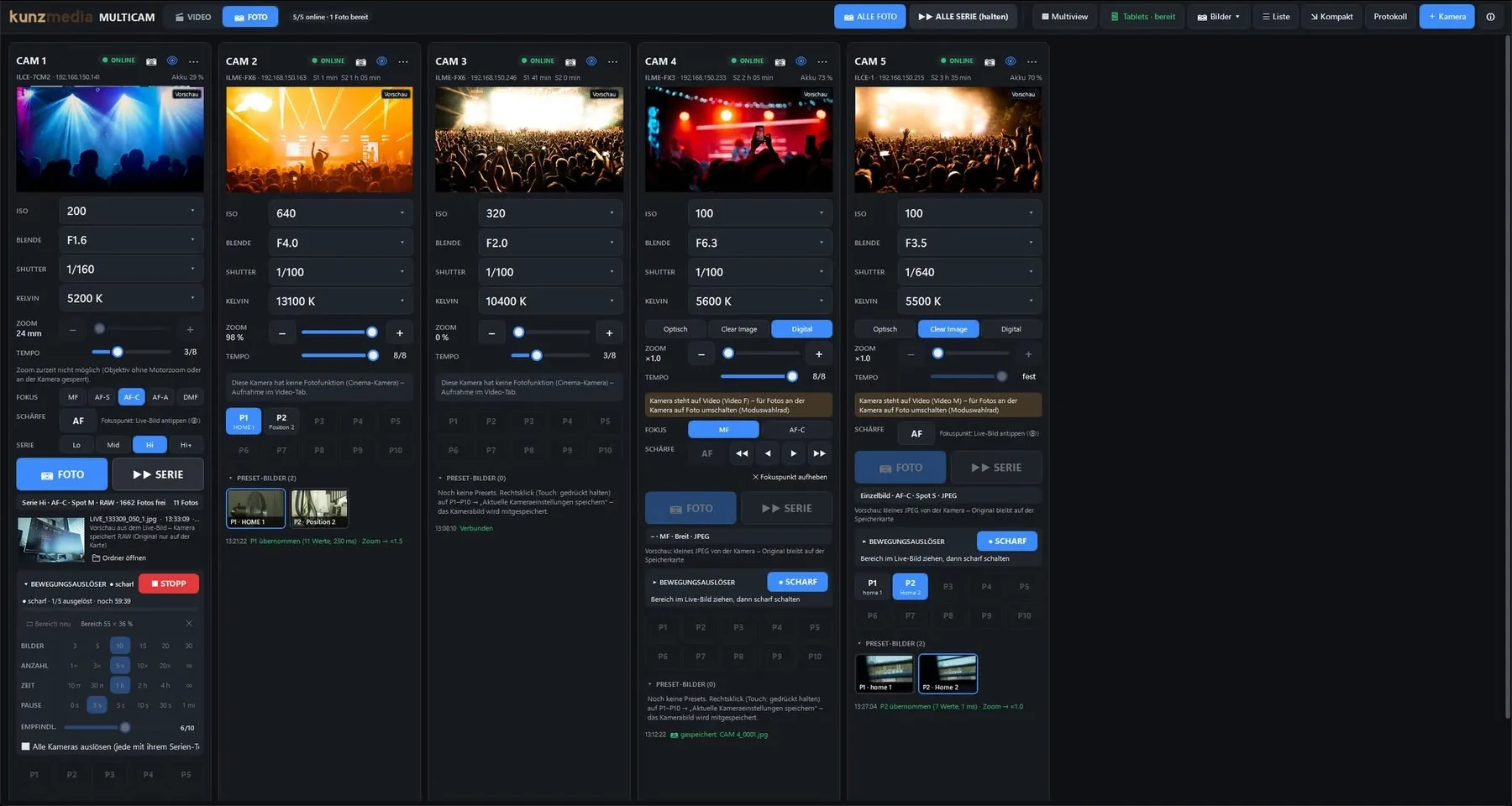
Controls the Sony cameras of a production centrally from the PC – exposure, focus, recording, presets, photos and live view – and on the BRC-AM7 and FR7 PTZ cameras, the position too. Plus tally from the ATEM video switcher and control via tablet, Stream Deck or Bitfocus Companion.
  • ISO, iris, shutter, Kelvin and zoom – for every camera
  • REC for all with one command, 10 presets per camera
  • PTZ cameras BRC-AM7 and FR7: presets with position – matching the joystick controller
  • Focus with a click into the live view, multiview
  • ATEM tally – even with a layout mixer
  • Photos, bursts and motion trigger
  • Sony Cinema Line, Alpha & PTZ
  • Windows
  • English & Deutsch
KunzMedia Camera Control [S]
Main window of Camera Control [S] with five connected cameras, live views, exposure values, presets and motion trigger
02 · KunzMedia Drive Catalog

A catalog for your drives

Every drive.
One catalog.

Gives every USB stick, external drive, memory card and NAS share a number and records every folder and file. Searching takes a split second – even when the drive is sitting in a cupboard.

  • Search across all drives – without plugging them in
  • Thumbnails for photos, RAW, videos, PDF and SVG
  • Copies & backups: find duplicate folders, spot what isn’t backed up
  • Table of contents as PDF – with your own logo, ideal for handovers
  • What has changed? If 300 files suddenly go missing, it warns you before the backup
  • Drive care: reminders for drives in the cupboard, health via SMART
  • NewDrive list your way: your own order, colours, collapse cards one by one
  • NewMerge catalogs – clashing numbers are reassigned
  • Storage at a glance, labels with number and location
  • For large amounts of data: millions of files, searched in no time
  • USB, external, NAS
  • Windows
  • English & Deutsch
KunzMedia Drive Catalog
Main window of Drive Catalog: the numbered drives on the left, the search “hochzeit” with 120 results on three drives on the right
03 · KunzMedia LIVE Plus

Live graphics for the Mac

Live graphics.
Straight into the switcher.

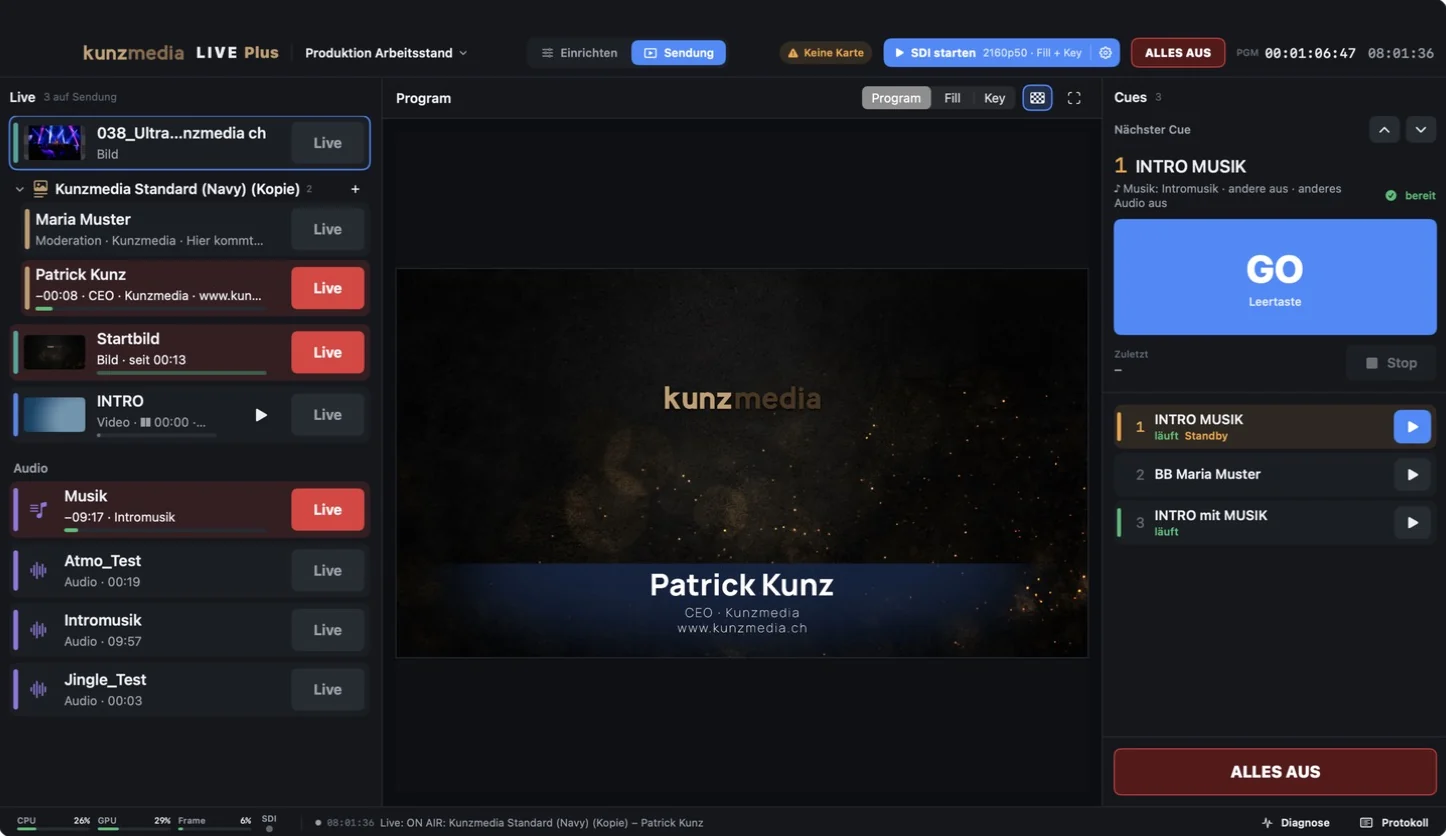
Plays out lower thirds, logos, images, videos and sound live – as fill and key through a Blackmagic DeckLink card, straight into the video switcher. Every name has its own Live button, the rundown runs on GO – from the Mac, a tablet or a Stream Deck. It also switches the layouts of the ATEM SuperSource, renders lower thirds as files for social media and turns the HyperDeck recording into a ready-made timeline for DaVinci Resolve.
  • Fill + key via DeckLink, 1080p and 2160p
  • Lower thirds: every speaker with their own Live button, templates with an editor
  • Layouts for the ATEM SuperSource: picture in picture with one click, animated too
  • Lower thirds as files in 16:9, 4:5 and 9:16 – with Social Graphics for the team
  • Recording with HyperDecks: the live cut and every camera as a timeline for DaVinci Resolve
  • Images, videos with alpha (ProRes 4444, HEVC) and audio as layers
  • Cues with GO on the space bar and freely assignable hotkeys
  • Show mode with big buttons, projects with all their media
  • Remote control in the browser, with Stream Deck and Bitfocus Companion – can be switched off
  • Blackmagic DeckLink
  • ATEM
  • HyperDeck
  • macOS
  • Interface in German
KunzMedia LIVE Plus
LIVE Plus in show mode: on the left an image, the lower third “Patrick Kunz” and music on air, the program in the middle showing the lower third, the next cue with a big GO on the right

From the lab

Built for our own work.

Made in practice

Every tool was first built for our own productions – on set, in the control room and in the archive – and is used there every day.

For Windows and Mac

Camera Control [S] and Drive Catalog run on Windows PCs with a 64-bit processor, in English and German. LIVE Plus runs on the Mac.

Stays with you

No account, no cloud: cameras and live graphics are controlled in your own network, the drive catalog lives in an ordinary folder, the graphics go straight into the switcher via SDI.

KunzMedia

Interested in a tool?

KunzMedia – photography, video, podcast and livestream. Ask us for a demo, about using it in your project or about an idea for the next tool.