
Images and logos
PNG and TIFF with transparency, JPEG, HEIC, PDF, PSD and more.
- Position, size and crop right in the preview
- Full screen with one click
- Display time or endless

Live graphics for the Mac
LIVE Plus plays out lower thirds, logos, images, videos and sound live – as fill and key through a Blackmagic DeckLink card, straight into the video switcher. Every name has its own Live button, the rundown runs on GO – from the Mac, a tablet or a Stream Deck. It also switches the layouts of the ATEM SuperSource, renders lower thirds as files for social media and turns the HyperDeck recording into a ready-made timeline for DaVinci Resolve.
SDI via DeckLink
LIVE Plus outputs the graphics through a Blackmagic DeckLink card as two SDI signals: fill with the picture and key with the transparency. The video switcher – an ATEM, for example – keys the graphics over the camera image.


Lower thirds
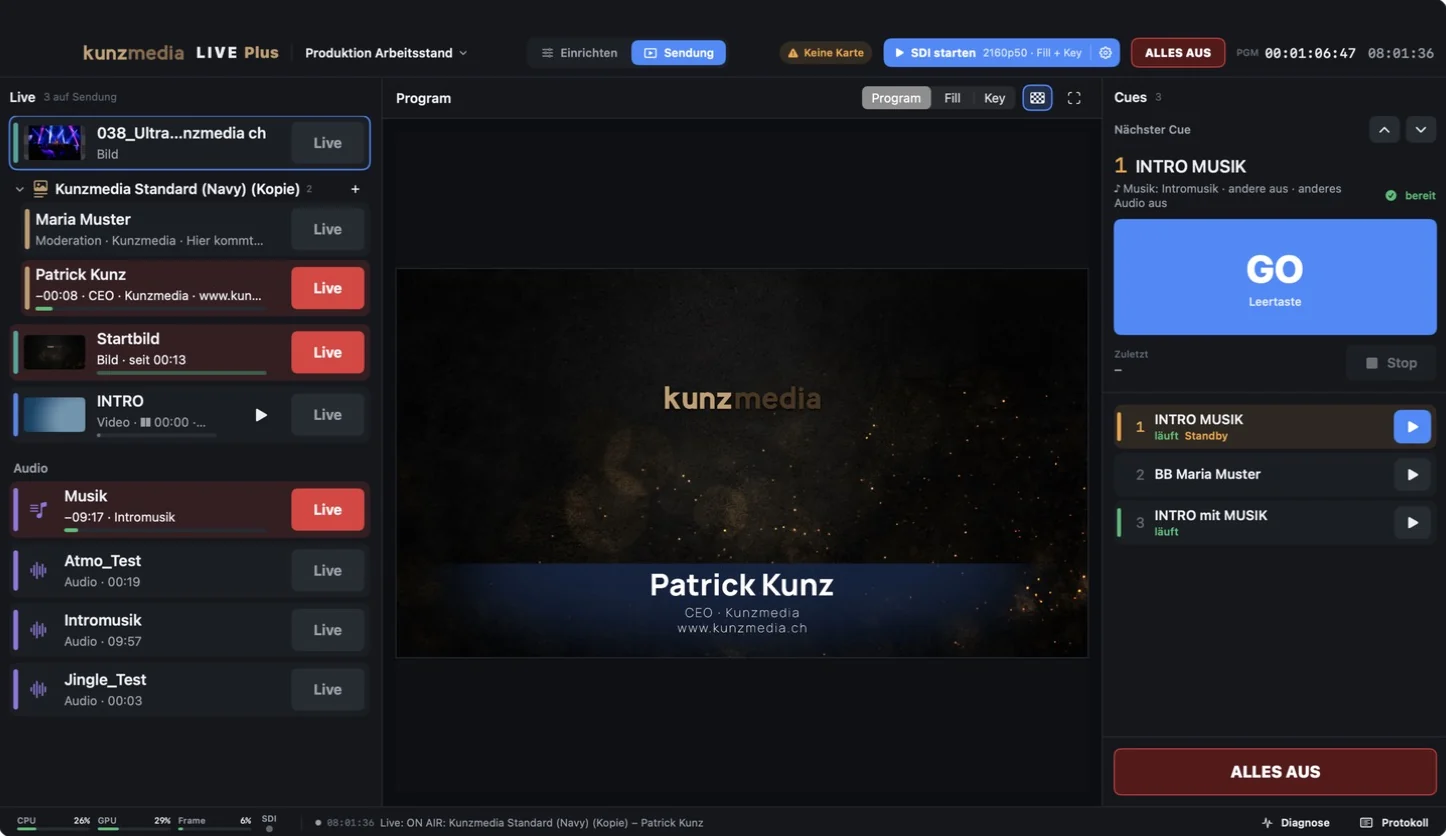
Every speaker has their own row with a Live button. One click takes them on air – if someone else is already on, it switches. Whoever comes next is prepared and marked in yellow.

Media
Drag files into the sources, drop them on the layer list, press Live. Whatever is on top is in front.
PNG and TIFF with transparency, JPEG, HEIC, PDF, PSD and more.
ProRes 4444 and HEVC with transparency, plus H.264, HEVC and ProRes 422.
Every audio file becomes its own layer with a Live button – for jingles, ambience and music.
Cues
A cue bundles what should happen with one click – say “logo on, roll video, music off”. GO on the space bar fires the cue on standby and prepares the next one, without touching what is on air.

Set-up and show
Set everything up before the show. During the show, only what matters – with big buttons and clear colours: red means on air, yellow means ready.

Sources with search and filter, layers and cues, program and a preview of the selected layer – with the properties in clear sections below.
Every layer with a big Live button, the program in the middle, the next cue with a big GO and ALLES AUS on the right. Nothing can be moved by accident.
ATEM SuperSource
LIVE Plus controls the SuperSource of an ATEM switcher: presentation and speaker side by side, four cameras in a grid or a small picture inside a large one. From one layout to the next, the boxes glide in an animation – or switch as a hard cut.

HyperDecks and DaVinci Resolve
During the recording, LIVE Plus logs every cut on the ATEM, the timecode of every HyperDeck and every graphic it plays out. From that it builds a timeline for DaVinci Resolve: the live cut on top, every camera in full on its own track below – ready to re-cut, with a marker at every cut.
Remote control
LIVE Plus can be operated remotely on your own network – over LAN or Wi-Fi, with no app and no cloud. Playout always comes first.
A tablet, phone or second computer shows the same Live buttons as the Mac: every layer, each speaker on their own, videos with play and restart, audio, the next cue with a big GO and ALLES AUS.


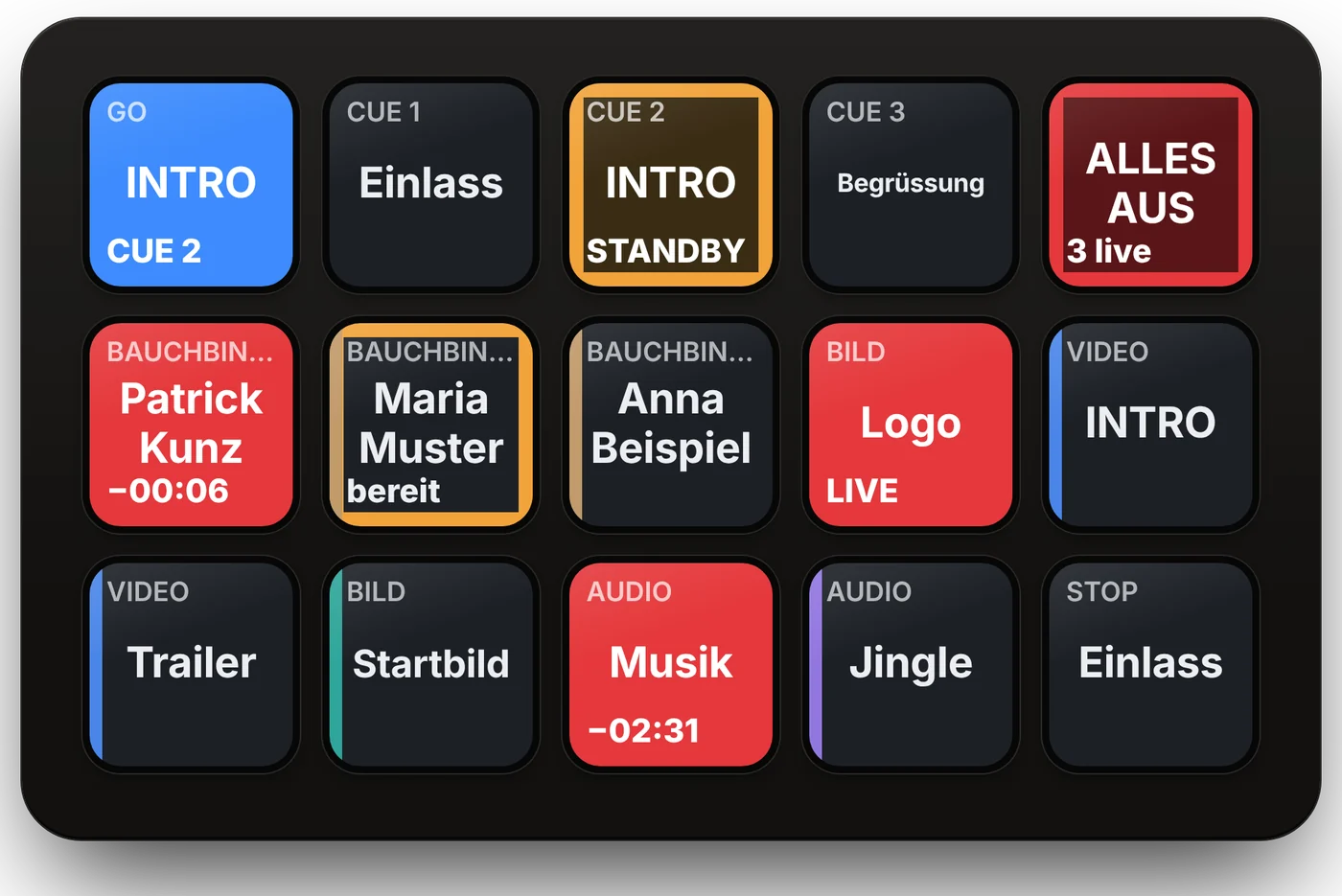
With Bitfocus Companion, every layer, speaker, cue and audio layer becomes a key on the Stream Deck. The keys show the state as well: red on air, yellow ready, plus the time remaining.
GET …/api/v1/ebene/2/referent/1
When it is off, no port is open and nothing runs alongside. A single switch in the “Fernsteuerung” window turns it on.
Browsers sign in with a PIN, Companion with a key. ALLES AUS and audio can be locked for remote control, and every command is logged.
Networking runs at low priority next to the render engine. 16 Stream Deck keys and two browsers cost around 0.2 % of the CPU.
Tested under load
The built-in stress test keeps switching layers, lower thirds, videos and cues – and measures every frame that goes to the card.
Measured on a MacBook Pro with M1 Pro and a Blackmagic DeckLink 8K Pro. The stress test is part of LIVE Plus under “Diagnose” – to check the Mac and the card before the show, with the readings saved as CSV.
Projects
Every production is a project with its own folder: layers, speakers, cues, audio and hotkeys. The start screen shows every project with a thumbnail.

Key facts
KunzMedia LIVE Plus
Ask us for a demo or about using LIVE Plus at your event.
Lower thirds as files
For social media.
And for the whole team.
The same lower third that goes out live over SDI is also available as a file with transparency – landscape for editing, portrait for Reels and Stories.
16:9, 4:5 and 9:16
Every template rearranges itself for feed, Reels, Shorts and Stories – and can be fine-tuned by hand for each format.
Rendering with transparency
All speakers in one pass as files – for editing or straight to the phone.
Social Graphics for the team
The lower-third editor also comes as a separate program for colleagues – no show, no DeckLink card.